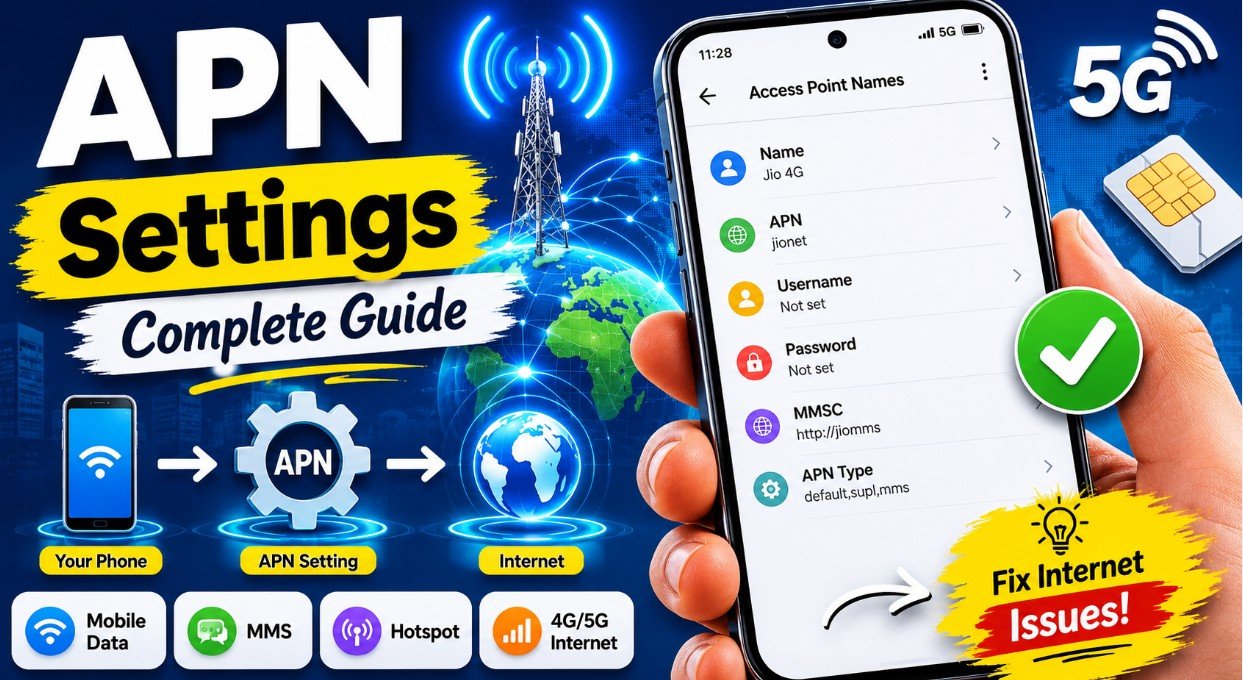
APN and APN Settings: The Complete Beginner’s Guide (2026 Update)
Introduction
Have you ever inserted a new SIM card into your phone, made a call successfully, but found that mobile internet simply wouldn’t work? Or perhaps you’ve traveled abroad and suddenly lost data connectivity? In many cases, the culprit is incorrect or missing APN settings.
APN (Access Point Name) is one of the most critical yet least understood components of mobile network configuration. It serves as the essential bridge between your smartphone and your carrier’s internet gateway. Without properly configured APN settings, your phone may connect to the network for calls and SMS but remain unable to access mobile data, send multimedia messages, or function as a mobile hotspot.
This comprehensive guide explains what APN is, how APN settings work, why they matter, and how to configure or troubleshoot them on your device. All information has been verified against the latest 2026 updates.
📌 What Is APN? The 2026 Definition
APN stands for Access Point Name. In simple terms, it is a configuration setting that tells your mobile device how to connect to your carrier’s network for data services.
Technical Explanation
An APN is a gateway between your mobile network and the internet. When you enable mobile data on your phone, the device uses the APN settings to request a connection to your carrier’s network. The carrier authenticates your device, assigns an IP address, and establishes a data session.
The Connection Flow
📱 Your Phone → 🌐 APN Configuration → 📡 Mobile Carrier Network → 🚀 Internet
Think of APN as the “address” your phone uses to find the correct entry point to your carrier’s data services. Without a valid APN, your phone may successfully register on the network but will be unable to access internet services.
⚙️ What Are APN Settings? Components Explained
APN Settings are the specific network parameters stored on your phone that determine how data connections are established and maintained. Modern smartphones usually configure these automatically when you insert a SIM card, but manual configuration is sometimes necessary.
Key Components of APN Settings
| Setting | Purpose | Requirement |
|---|---|---|
| Name | A descriptive label for the APN profile | User-defined |
| APN | The gateway address provided by the carrier | Always required |
| Username | Authentication username for network access | Sometimes required |
| Password | Authentication password for network access | Sometimes required |
| Proxy Server Address | Hostname or IP of the data routing proxy | Optional |
| Proxy Server Port | Port number for proxy server (default: 143) | Optional |
| MMSC | Multimedia Messaging Service Center URL | Required for MMS |
| MMS Proxy | Proxy server for MMS messages | Sometimes required |
| MCC | Mobile Country Code | Carrier-specific |
| MNC | Mobile Network Code | Carrier-specific |
| APN Type | Service type: internet, MMS, hotspot, etc. | Important for functionality |
| Authentication Type | PAP (plain text) or CHAP (encrypted) | Carrier-specific |
| APN Protocol | IPv4, IPv6, or IPv4/IPv6 dual stack | Affects connectivity |
Important 2026 Update
As of early 2026, users are no longer required to manually enter values for MCC and MNC as part of APN settings in many cases. These are now automatically populated from the SIM card data. However, if the SIM card data cannot be updated to match the carrier’s exact current values, APN configuration may still fail.
🤔 Why Are APN Settings Important?
Correct APN settings are essential for virtually every data-related function on your mobile device.

🌍 Mobile Internet Access
APN enables internet connectivity over 2G, 3G, 4G LTE, and 5G networks. Without the correct APN, your phone will display network signal bars but remain unable to load websites or use online apps.
📩 MMS Messaging
Multimedia Messaging Service (MMS) relies on a separate APN configuration from internet data. The APN must include the MMSC (Multimedia Messaging Service Center) URL and sometimes an MMS proxy. If these settings are missing or incorrect, you won’t be able to send or receive picture messages.
🔥 Mobile Hotspot and Tethering
The Personal Hotspot feature often requires specific APN settings, typically with the “dun” (dial-up networking) APN type enabled. If your APN doesn’t support this, hotspot functionality may be unavailable.
📶 Better Network Performance
Correct APN settings help maintain stable connectivity and can prevent frequent disconnections or slow data speeds.
🚨 Signs of Incorrect APN Settings
You may have an APN configuration problem if you experience any of the following issues:
| Issue | Description |
|---|---|
| ❌ Mobile data doesn’t work | Phone shows signal but no internet access |
| ❌ Websites won’t load | Pages time out even though signal is strong |
| ❌ MMS messages fail | Can’t send or receive picture/video messages |
| ❌ Hotspot doesn’t work | Other devices connect but have no internet |
| ❌ 4G/5G unavailable | Phone drops to lower network modes |
| ❌ Frequent disconnections | Internet connection drops repeatedly |
| ❌ “PDP Authentication Error” | Specific error indicating APN authentication issues |
🔍 How Does APN Work? The Technical Process
When you enable mobile data on your device, the following sequence occurs automatically:
Step 1: Connection Request
Your phone sends a connection request to the mobile network using the stored APN information.
Step 2: Gateway Identification
The APN identifies the correct carrier gateway for the requested data service.
Step 3: Authentication
The carrier authenticates your device using the provided username, password, and authentication protocol (PAP or CHAP).
Step 4: IP Address Assignment
Upon successful authentication, the network assigns an IP address to your device.


Step 5: Data Session Established
Internet access becomes available. This entire process typically completes in just a few seconds.
📱 How to Check and Configure APN Settings
Android Devices (General Instructions)
Most Android devices follow these steps to access APN settings:
- Open Settings
- Tap Connections or Network & Internet
- Select Mobile Networks or Mobile Data
- Tap Access Point Names (APN)
- View existing APN profiles or tap the + icon to add a new one
- Enter the settings provided by your carrier
- Tap Save and select the new APN profile
- Restart your phone for changes to take effect
Important Note for 2026: When manually creating a new APN, ensure there are no spaces in any field, and use all lowercase letters where specified by your carrier.
iPhone / iOS Devices
For iPhone users, APN settings are typically automatically configured. To check or modify them:
- Open Settings
- Tap Cellular or Mobile Data
- Select Cellular Data Network
- View the APN settings fields for Cellular Data, LTE, and Personal Hotspot
- Update settings as needed based on carrier specifications
Some carriers lock APN settings on iOS devices, configuring them automatically via carrier profile updates.
Resetting APN to Default
If you’ve made changes that aren’t working, resetting APN settings often resolves issues:
Android:
- Open APN Settings
- Tap the menu (three dots)
- Select Reset to Default
- Restart the device
iPhone:
- Open Settings → General
- Tap Transfer or Reset iPhone or Reset
- Select Reset Network Settings
- Note: This will also remove saved Wi-Fi passwords
Alternative: Carrier OTA Reset
If manual configuration is challenging, you can ask your carrier to send an APN reset Over The Air (OTA). This automatically pushes the correct settings to your device.
🌍 2026 APN Examples from Major Carriers Worldwide
Based on the latest documentation from multiple carriers and technical sources, here are verified APN settings for major operators:



🇺🇸 United States
| Carrier | APN | Protocol | Notes |
|---|---|---|---|
| T-Mobile | fast.t-mobile.com | IPv4/IPv6 | Standard consumer APN |
| AT&T | phone or broadband | IPv4/IPv6 | broadband used for IoT/enterprise |
| Verizon | vzwinternet | IPv4/IPv6 | Verizon IoT/enterprise APN |
| US Cellular | usccinternet | IPv4 | Standard consumer APN |
🇨🇦 Canada
| Carrier | APN | Protocol |
|---|---|---|
| Rogers | ltemobile.apn | IPv4/IPv6 |
| Bell | pda.bell.ca | IPv4/IPv6 |
| Telus | sp.telus.com | IPv4/IPv6 |
| Freedom | internet.freedommobile.ca | IPv4/IPv6 |
🇬🇧 United Kingdom
| Carrier | APN | Protocol |
|---|---|---|
| EE | everywhere | IPv4/IPv6 |
| Vodafone | wap.vodafone.co.uk | IPv4/IPv6 |
| O2 | payandgo.o2.co.uk | IPv4/IPv6 |
| Three | three.co.uk | IPv4/IPv6 |
🇩🇪 Germany
| Carrier | APN | Protocol |
|---|---|---|
| Deutsche Telekom | internet.telekom | IPv4/IPv6 |
| Vodafone | web.vodafone.de | IPv4/IPv6 |
🇫🇷 France
| Carrier | APN |
|---|---|
| Orange | orange.fr |
🇮🇳 India
| Carrier | APN | Notes |
|---|---|---|
| Jio | jionet | Standard consumer APN |
| Airtel | airtelgprs.com | Standard consumer APN |
🇯🇵 Japan
| Carrier | APN | Username | Password |
|---|---|---|---|
| Sakura Mobile | vmobile.jp | sakura@sakuramobile.jp | sakura |
🇦🇪 UAE
| Carrier | APN |
|---|---|
| Etisalat | mnet |
| Du | du |
🚀 Tips to Improve Mobile Data Performance
To ensure optimal connectivity, follow these 2026-recommended practices:
✅ Keep APN Settings Updated
Carriers occasionally update their APN configurations. If you experience connectivity issues after a carrier update, check for new settings.
✅ Restart Your Phone After APN Changes
Always restart your device after modifying APN settings to ensure changes take effect properly.
✅ Use 4G or 5G Mode When Available
Configure your network preferences to prioritize modern network technologies for better performance.
✅ Update Carrier Settings
Both Android and iOS devices periodically receive carrier settings updates. Ensure these are installed promptly.
✅ Check Network Coverage
Even with correct APN settings, data connectivity requires adequate signal strength and network availability.
✅ For eSIM Users
If you’re using an eSIM, ensure the APN configuration is completed as the final step of the eSIM setup procedure. eSIM users may need to install a carrier profile via Safari on iOS devices.
❓ Frequently Asked Questions (2026 Updates)
What does APN stand for?
APN stands for Access Point Name.
Can APN settings increase internet speed?
Correct APN settings improve connectivity and stability but cannot exceed your carrier’s network capabilities. The APN determines connection reliability, not maximum speed potential.
Is it safe to change APN settings?
Yes, as long as you use settings officially provided by your carrier. However, caution is recommended—incorrect changes may cause the device to lose internet connectivity.


Why is my mobile data not working?
Common reasons in 2026 include:
- Incorrect or outdated APN settings
- Poor signal strength
- SIM card issues
- Carrier network problems
- Incomplete eSIM setup
- Carrier-side APN data mismatch
Does Wi-Fi use APN settings?
No. APN settings are only used for mobile data connections. Wi-Fi connections operate independently of cellular APN configuration.
What is the difference between PAP and CHAP authentication?
- PAP (Password Authentication Protocol): Uses passwords as plain, non-encrypted text.
- CHAP (Challenge Handshake Authentication Protocol): Uses standard MD5 hashing to encrypt the response for greater security.
Do I still need to enter MCC and MNC manually in 2026?
As of early 2026, these values are typically automatically populated from the SIM card. Manual entry is only necessary in troubleshooting situations where the automatic population fails.
🎯 Conclusion
APN (Access Point Name) serves as the critical gateway connecting your smartphone to your mobile carrier’s internet network. APN settings tell your device exactly how to establish that connection, enabling mobile data, MMS, and hotspot functionality.
While most modern smartphones configure APN settings automatically when you insert a SIM card, manual configuration or troubleshooting remains necessary in many situations—especially when traveling, using eSIMs, or dealing with connectivity issues.
As of 2026, key updates include simplified MCC/MNC handling (now mostly automatic), continued reliance on carrier-provided APN profiles for iOS devices, and the importance of carrier OTA resets as a troubleshooting option.
Whether you’re using Android or iPhone, understanding APN settings helps you troubleshoot connectivity problems quickly and keep your mobile internet running smoothly. For specific APN values, always consult your carrier’s official documentation or support resources, as settings can change and vary by plan type.
Disclaimer: While this guide is based on the latest 2026 information, APN settings are carrier-specific and subject to change—always verify with your mobile network operator before making manual changes, as incorrect configurations may disrupt your service.
